> For the complete documentation index, see [llms.txt](https://docs.spyderbat.com/llms.txt). Markdown versions of documentation pages are available by appending `.md` to page URLs; this page is available as [Markdown](https://docs.spyderbat.com/concepts/integrations/siem-forwarding.md).
# SIEM Forwarding
How Spyderbat SIEM forwarding works — enabling forwarding on saved queries and deploying the Event Forwarder to deliver events to your SIEM.
{% hint style="success" %}
Just want to get started? See the [SIEM Forwarding Quickstart](/tutorials/integrations/siem-forwarding-quickstart.md).
{% endhint %}
SIEM forwarding in Spyderbat is a two-part system. First, you enable forwarding on one or more saved searches (also called saved queries in the API and spyctl CLI), which tells Spyderbat which events to collect. Second, you deploy the Event Forwarder (or poll the API directly), which retrieves those collected events and delivers them to your SIEM. The Event Forwarder only receives events that a saved search has already selected for forwarding — without step one, step two delivers nothing. You can install the Event Forwarder before or after enabling forwarding on a saved search — the forwarder polls continuously and picks up new forwarding-enabled queries automatically.
## How it works
```mermaid
flowchart TD
A["Saved query (SIEM Forwarding: enabled)"] -->|record matches| B["Buffered events"]
B -->|Event Forwarder polls| C["Event Forwarder"]
B -.->|or direct API polling| E["Your SIEM"]
C --> D["File / Webhook / Stdout / Syslog"]
D --> E
```
When an incoming record matches a saved search that has SIEM forwarding enabled, Spyderbat buffers that record for your organization. The Event Forwarder polls for new records, enriches each one with a `runtime_details` object containing host metadata, and writes to your configured destination. You can also skip the Event Forwarder and poll the API directly, but this requires custom scripting to manage the cursor.
## Step 1: Enable forwarding on a saved query
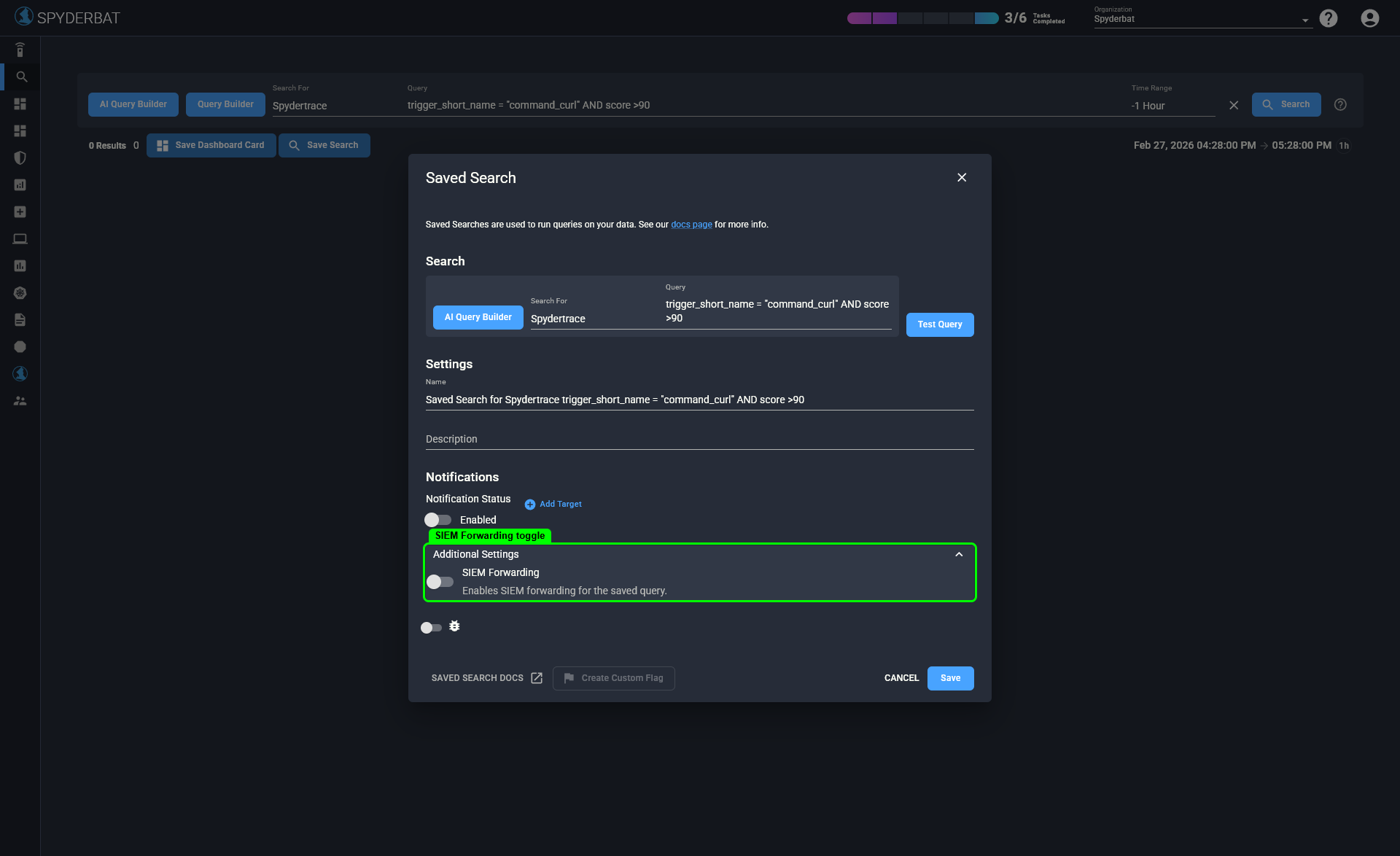
If you don't have a saved query yet, [create one first](/concepts/search/saved-search.md). Then enable the **SIEM Forwarding** toggle in **Additional Settings** when editing the query. Scroll to the bottom of the edit dialog to find **Additional Settings** — this section may not be visible without scrolling. Forwarding takes effect immediately for new matching records — it does not retroactively forward records that were created before forwarding was enabled. No forwarder restart is needed. You can enable it on as many queries as you want, across any Spyderbat schema. If a record matches multiple forwarding-enabled queries, it is forwarded once.
**Example queries:**
| Intent | Schema | Filter |
| ------------------------ | ------------------- | ------------------- |
| All Spydertraces | `model_spydertrace` | `*` |
| High-scoring traces only | `model_spydertrace` | `score > 50` |
| All security flags | `event_redflag` | `*` |
| High-severity flags only | `event_redflag` | `severity = "high"` |
| All network connections | `model_connection` | `*` |
{% hint style="info" %}
The Schema values above (`model_spydertrace`, `event_redflag`, etc.) are the API and spyctl identifiers. The search UI uses friendlier display names — for example, the UI shows "Spydertrace" for `model_spydertrace`. Select the matching display name from the schema dropdown when building queries in the console.
{% endhint %}
Enable SIEM Forwarding in Additional Settings when editing a saved search.
To confirm forwarding is enabled, open **Saved Searches**: expand the **Search** icon in the sidebar, then click **Saved Searches**. Scroll right in the table to the **SIEM Forwarding** column — it should show a checkmark (✓) for your query. Alternatively, click the **SIEM Forwarding** filter button at the top of the table to show only SIEM-enabled queries.
To disable forwarding, edit the saved search and uncheck **SIEM Forwarding** in **Additional Settings**. Changes take effect immediately without restarting the forwarder. The forwarder continues running and delivers events from other forwarding-enabled queries in your org.
For step-by-step instructions, see the [SIEM Forwarding Quickstart](/tutorials/integrations/siem-forwarding-quickstart.md#step-1-enable-siem-forwarding-on-a-saved-query). Requires the `org:ManageSiemForwarding` permission.
## What gets forwarded
The API returns raw matching records, delivered as-is. If you poll the API directly (without the Event Forwarder), you receive raw records without `runtime_details` enrichment. If you use the Event Forwarder, it enriches each record with host metadata before writing to your destination. See [runtime\_details enrichment](/concepts/integrations/spyderbat-event-forwarder.md#runtime-details-enrichment) for the injected fields.
## Step 2: Deploy the Event Forwarder
The [Event Forwarder](https://github.com/spyderbat/event-forwarder) is the recommended way to deliver events to your SIEM. It polls the API, enriches records with host metadata, and writes to files, stdout, syslog, or HTTP webhooks. It persists its position to disk, so it resumes where it left off across restarts.
For architecture details, see [Spyderbat Event Forwarder](/concepts/integrations/spyderbat-event-forwarder.md). Install guides:
* [Kubernetes — Helm Chart](/installation/spyderbat-event-forwarder/helm-chart.md)
* [Linux — Traditional Installer](/installation/spyderbat-event-forwarder/traditional-installer.md)
## Choosing a delivery method
| Approach | Best for | Tradeoff |
| ------------------ | ------------------- | --------------------------------------------------------------------------------------------------------------------- |
| Event Forwarder | Most deployments | Adds `runtime_details` enrichment, handles cursor management and retries. Requires deploying an additional component. |
| Direct API polling | Custom integrations | No extra component to deploy. Requires scripting to manage the cursor and handle errors. No host metadata enrichment. |
## Accessing the API directly
You can poll the API endpoint directly and skip the Event Forwarder. You won't get `runtime_details` enrichment, but you don't need to deploy an additional component. This approach requires custom scripting to manage the cursor — most SIEMs don't support cursor-based pagination natively.
Your first call omits the cursor (or passes `OLDEST` / `LATEST`):
```http
GET https://{api-host}/api/v1/org/{your-org-uid}/events
Authorization: Bearer
```
Replace `{api-host}` with your Spyderbat API hostname (visible in your browser when using the console). For API key setup, see [How to Create and Use a Spyderbat API Key](/tutorials/integrations/how-to-set-up-your-spyderbat-api-key-and-use-the-spyderbat-api.md).
The response is newline-delimited JSON (ndjson). Event records come first, followed by a final line containing the cursor for your next call:
```
{"schema":"model_process","id":"proc:abc123","muid":"mach:xyz789","name":"/usr/bin/curl","time":1719500000.0}
{"schema":"model_connection","id":"conn:def456","muid":"mach:xyz789","server_port":443,"time":1719500001.0}
{"iterator":"eyJvcmdfdWlkIjoib3JnOnNweWRlcmJhdCIsIm9mZnNldCI6MTcxOTUwMDAwMH0"}
```
Pass the returned cursor on subsequent calls:
```http
GET https://{api-host}/api/v1/org/{your-org-uid}/events/{cursor}
Authorization: Bearer
```
**Cursor values:**
| Value | Behavior |
| --------------- | -------------------------------------------------------- |
| *(omitted)* | Same as `OLDEST` |
| `OLDEST` | Start from the earliest buffered record |
| `LATEST` | Start from now (skip historical backlog) |
| Returned cursor | Continue from the position returned by the previous call |
**Query parameters:**
| Parameter | Description |
| --------- | ---------------------------------------------------------------- |
| `limit` | Number of records per call. Range: 1,000–10,000. Default: 1,000. |
Pagination is forward-only. You cannot seek backward to a previous position.
## Related pages
* [Saved Searches](/concepts/search/saved-search.md)
* [Spyderbat Event Forwarder](/concepts/integrations/spyderbat-event-forwarder.md)
* [SIEM Forwarding Quickstart](/tutorials/integrations/siem-forwarding-quickstart.md)
* [Panther Webhook Configuration](/tutorials/integrations/forwarder-panther-config.md)
* [Install: Helm Chart](/installation/spyderbat-event-forwarder/helm-chart.md)
* [Install: Traditional Installer](/installation/spyderbat-event-forwarder/traditional-installer.md)